Mtk Client Tool V5.2 Mediatek All is a powerful software application designed specifically for MediaTek chipsets. It enables users to perform various operations on their MediaTek-powered devices, such as flashing firmware, rooting, and customizing the device's settings.
This tool is a valuable resource for both individual users and professionals who need to work with MediaTek devices. It is easy to use and comes with a user-friendly interface. Additionally, it supports a wide range of MediaTek chipsets, making it a versatile tool for many devices.
Main article topics:
- Features of Mtk Client Tool V5.2 Mediatek All
- How to use Mtk Client Tool V5.2 Mediatek All
- Benefits of using Mtk Client Tool V5.2 Mediatek All
- Alternatives to Mtk Client Tool V5.2 Mediatek All
Mtk Client Tool V5 2 Mediatek All
Mtk Client Tool V5 2 Mediatek All is a versatile software application designed for MediaTek chipsets, offering a comprehensive suite of features for device management and customization.
- Flashing firmware: Update or downgrade device firmware.
- Rooting: Gain elevated privileges for advanced customization.
- Custom recovery: Install custom recovery images for advanced operations.
- IMEI repair: Restore or modify device IMEI numbers.
- Screen lock removal: Bypass forgotten screen lock patterns or passwords.
- Factory reset: Wipe device data and restore factory settings.
- Read/write partitions: Access and modify specific device partitions.
- Backup/restore: Create and restore device backups.
- Diagnostics and troubleshooting: Perform device diagnostics and resolve issues.
These key aspects highlight the versatility and functionality of Mtk Client Tool V5 2 Mediatek All, making it an essential tool for MediaTek device users and professionals.
Flashing Firmware
The ability to flash firmware is a crucial aspect of Mtk Client Tool V5.2 Mediatek All, enabling users to update or downgrade the firmware on their MediaTek devices. Firmware, which refers to the low-level software that controls the device's hardware, plays a vital role in determining the device's performance, stability, and features.
Updating the firmware can bring several benefits, including:
- Improved device performance and stability
- New features and functionality
- Bug fixes and security patches
Downgrading the firmware may be necessary in certain scenarios, such as when a new firmware update causes unexpected issues or when a user wants to revert to a previous version that may have been more stable. Mtk Client Tool V5.2 Mediatek All provides a safe and convenient way to perform both firmware updates and downgrades.
The ability to flash firmware is particularly important for advanced users and professionals who need to maintain and customize their MediaTek devices. It allows them to take full control of their devices and optimize their performance according to their specific needs and preferences.
Rooting
Rooting is the process of gaining elevated privileges on an Android device, allowing users to access and modify system settings and files that would normally be inaccessible. This level of access opens up a wide range of possibilities for advanced customization and optimization.
Mtk Client Tool V5 2 Mediatek All includes a dedicated rooting feature that simplifies the rooting process for MediaTek devices. By rooting a device using this tool, users can:
- Remove pre-installed bloatware and system apps.
- Install custom ROMs and kernels for enhanced performance and features.
- Tweak system settings and configurations to improve battery life, performance, and stability.
- Gain access to advanced debugging and diagnostic tools.
The ability to root a device provides users with a high degree of control over their devices. It allows them to tailor their devices to their specific needs and preferences, unlocking the full potential of their MediaTek chipsets.
However, it's important to note that rooting a device can also void the device's warranty and may introduce potential security risks. Therefore, it's crucial to proceed with caution and only root a device if the benefits outweigh the risks.
Custom recovery
Custom recovery plays a vital role in the advanced customization and management of MediaTek devices. It refers to a modified version of the stock recovery environment that provides users with a wider range of features and capabilities.
- Installation of Custom ROMs: Custom recovery allows users to install custom ROMs, which are modified versions of the Android operating system. These ROMs can provide enhanced features, performance improvements, and a more personalized user experience compared to stock ROMs.
- Nandroid backups: Custom recovery enables users to create and restore Nandroid backups, which are complete backups of the entire device's file system and user data. These backups serve as a safety net in case of system failures or data loss.
- Advanced troubleshooting: Custom recovery provides advanced troubleshooting options, such as the ability to wipe specific partitions, fix boot loops, and restore the device to its factory state. These features are invaluable for resolving complex software issues.
- ADB and Fastboot support: Custom recovery often includes support for ADB (Android Debug Bridge) and Fastboot, which are powerful tools for debugging, flashing firmware, and modifying the device at a low level.
Mtk Client Tool V5 2 Mediatek All seamlessly integrates with custom recovery, allowing users to easily install custom recovery images and leverage its advanced features. This integration empowers users to unlock the full potential of their MediaTek devices and customize them to meet their specific needs and preferences.
IMEI repair
The International Mobile Equipment Identity (IMEI) is a unique 15-digit code that identifies every mobile phone. It is used by network operators to identify devices and track their location. In some cases, the IMEI number may become corrupted or lost, rendering the device unusable on cellular networks.
Mtk Client Tool V5.2 Mediatek All includes a dedicated IMEI repair feature that allows users to restore or modify the IMEI number on their MediaTek devices. This feature is particularly useful in situations where the IMEI number has been lost or damaged due to software glitches, hardware malfunctions, or rooting procedures.
By repairing the IMEI number, users can regain access to cellular networks and restore the full functionality of their devices. This is especially important for devices that are used in regions with multiple network operators, as the IMEI number is used to identify the device and allow it to connect to the appropriate network.
The ability to repair or modify the IMEI number is also beneficial for users who want to change the IMEI number for privacy or security reasons. However, it's important to note that modifying the IMEI number may be illegal in some countries and may void the device's warranty.
Screen lock removal
Mtk Client Tool V5 2 Mediatek All offers a valuable feature for bypassing forgotten screen lock patterns or passwords, providing a reliable solution to regain access to locked MediaTek devices.
- Reset Protection Removal:
One facet of screen lock removal involves bypassing FRP (Factory Reset Protection), a security measure that prevents unauthorized access after a factory reset. Mtk Client Tool V5 2 Mediatek All can disable FRP, allowing users to regain access to their devices even if they have forgotten their Google account credentials.
- Pattern and PIN Removal:
The tool also enables the removal of forgotten screen lock patterns and PINs. This is particularly useful when users are unable to remember their unlock patterns or have entered incorrect PINs multiple times, resulting in device lockout.
- Data Preservation:
In many cases, screen lock removal using Mtk Client Tool V5 2 Mediatek All can be achieved without data loss. This is crucial for users who have important data stored on their devices and cannot afford to lose it.
- Compatibility and Success Rates:
The tool supports a wide range of MediaTek devices and has a high success rate in bypassing screen locks. This makes it a reliable solution for users facing lockouts on their MediaTek-powered smartphones or tablets.
Overall, the screen lock removal feature in Mtk Client Tool V5 2 Mediatek All is a valuable asset for users who have forgotten their screen lock patterns or passwords, providing a convenient and effective way to regain access to their devices while preserving their data.
Factory reset
Factory reset is a critical component of Mtk Client Tool V5 2 Mediatek All, enabling users to wipe device data and restore factory settings. This feature is essential for various scenarios, including:
- Device troubleshooting: Factory reset can resolve persistent software issues, glitches, and performance problems by restoring the device to its original state.
- Data privacy: Before selling or discarding a device, users can perform a factory reset to erase all personal data and protect their privacy.
- Software updates: In some cases, a factory reset may be necessary to prepare a device for major software updates or to resolve issues that arise during the update process.
Mtk Client Tool V5 2 Mediatek All provides a safe and convenient way to perform a factory reset on MediaTek devices. The tool automates the process and ensures that all data is securely wiped, leaving the device in a clean and pristine state.
Understanding the importance of factory reset within Mtk Client Tool V5 2 Mediatek All empowers users to effectively troubleshoot device issues, protect their privacy, and maintain their devices in optimal condition.
Read/write partitions
The ability to read and write specific device partitions is an essential capability provided by Mtk Client Tool V5 2 Mediatek All, offering users granular control over their MediaTek devices.
Device partitions are logical divisions within the device's storage, each serving a specific purpose, such as storing the operating system, user data, or system configurations. By accessing and modifying these partitions, users can perform advanced tasks that are not possible through standard device settings or interfaces.
One key application of partition management is firmware modification. Users can read and write the firmware partition to flash custom ROMs, which are modified versions of the Android operating system. This allows for extensive customization, feature enhancements, and performance improvements.
Additionally, partition management enables data recovery in scenarios where the device's file system becomes corrupted or inaccessible. By accessing the data partition, users can extract important files and documents, minimizing data loss.
Furthermore, modifying specific partitions can resolve persistent software issues and bugs. By replacing corrupted or outdated partition contents, users can restore device stability and functionality.
The ability to read and write partitions is a powerful tool that empowers users to maintain, customize, and troubleshoot their MediaTek devices. Mtk Client Tool V5 2 Mediatek All provides a user-friendly interface and comprehensive features to harness this capability, making it an invaluable resource for advanced users and professionals.
Backup/restore
The backup and restore functionality in Mtk Client Tool V5 2 Mediatek All plays a critical role in maintaining data integrity and facilitating device recovery. It empowers users to create comprehensive backups of their MediaTek devices, ensuring the preservation of important data, settings, and applications.
Creating regular backups is essential for safeguarding against data loss in various scenarios. Whether due to accidental deletion, device theft, or system failures, having a reliable backup ensures that valuable information can be restored quickly and easily. The ability to restore backups allows users to recover their devices to a previous state, regaining access to lost data and configurations.
Moreover, backups serve as a safety net during firmware updates or major software changes. By creating a backup before initiating such processes, users can mitigate the risk of data loss if unforeseen circumstances arise. The restore functionality provides a way to revert to a stable backup in case of any issues or incompatibilities with the new firmware or software.
The significance of the backup and restore feature extends beyond individual users to professionals and businesses that rely on MediaTek devices. It enables them to create system images of devices configured with specific settings and applications, allowing for rapid deployment of consistent device configurations across multiple devices.
In summary, the backup and restore functionality in Mtk Client Tool V5 2 Mediatek All is a crucial component for data protection, device recovery, and efficient device management. By leveraging this feature, users can safeguard their data, minimize downtime, and maintain the integrity of their MediaTek devices.
Diagnostics and troubleshooting
Diagnostics and troubleshooting are crucial components of Mtk Client Tool V5 2 Mediatek All, empowering users to identify and resolve a wide range of device issues. This feature enables users to perform in-depth diagnostics to pinpoint the root cause of problems and implement effective solutions.
The ability to perform device diagnostics is particularly valuable in situations where the device is experiencing unexplained behavior, such as frequent crashes, freezes, or performance issues. By utilizing the diagnostic tools provided by Mtk Client Tool V5 2 Mediatek All, users can gather detailed information about the device's hardware and software components, allowing them to identify potential issues and take appropriate action.
Furthermore, the troubleshooting capabilities of Mtk Client Tool V5 2 Mediatek All extend beyond basic diagnostics. The tool offers guided troubleshooting procedures that provide step-by-step instructions on how to resolve common device issues. These procedures cover a wide range of problems, including connectivity issues, battery drain, and software errors.
In summary, the diagnostics and troubleshooting feature in Mtk Client Tool V5 2 Mediatek All is an indispensable tool for maintaining the health and performance of MediaTek devices. By providing users with the ability to identify and resolve issues effectively, this feature empowers them to maximize the functionality and longevity of their devices.
Frequently Asked Questions about "Mtk Client Tool V5 2 Mediatek All"
This section addresses commonly asked questions and misconceptions regarding "Mtk Client Tool V5 2 Mediatek All." The following Q&A pairs provide concise and informative answers to these inquiries.
Question 1: What is the purpose of Mtk Client Tool V5 2 Mediatek All?Mtk Client Tool V5 2 Mediatek All is a comprehensive software tool designed specifically for MediaTek chipsets. It empowers users to perform various operations on their MediaTek-powered devices, including firmware flashing, rooting, and customization of device settings.
Question 2: What are the key features of Mtk Client Tool V5 2 Mediatek All?Mtk Client Tool V5 2 Mediatek All offers a wide range of features, including firmware flashing, rooting, custom recovery installation, IMEI repair, screen lock removal, factory reset, partition management, backup and restore, and diagnostics and troubleshooting.
Question 3: Is Mtk Client Tool V5 2 Mediatek All easy to use?Yes, Mtk Client Tool V5 2 Mediatek All features a user-friendly interface that makes it accessible to both novice and experienced users. The tool provides clear instructions and step-by-step guidance for each operation.
Question 4: Is Mtk Client Tool V5 2 Mediatek All compatible with all MediaTek devices?Mtk Client Tool V5 2 Mediatek All supports a wide range of MediaTek chipsets and devices. However, compatibility may vary depending on the specific device model and firmware version. It is recommended to check the tool's documentation for supported devices.
Question 5: Are there any risks associated with using Mtk Client Tool V5 2 Mediatek All?While Mtk Client Tool V5 2 Mediatek All is generally safe to use, certain operations, such as rooting and flashing custom firmware, may void the device's warranty and introduce potential risks. It is important to proceed with caution and carefully consider the potential consequences before performing advanced operations.
Question 6: Where can I find more information about Mtk Client Tool V5 2 Mediatek All?Additional information, tutorials, and support resources for Mtk Client Tool V5 2 Mediatek All can be found on the tool's official website, online forums, and dedicated communities.
Summary: Mtk Client Tool V5 2 Mediatek All is a powerful and versatile tool for managing and customizing MediaTek devices. By understanding its capabilities and using it responsibly, users can unlock the full potential of their devices while maintaining stability and data integrity.
Transition: For further exploration of Mtk Client Tool V5 2 Mediatek All, refer to the comprehensive guide provided in the following article section.
Tips for Using Mtk Client Tool V5 2 Mediatek All
To maximize the effectiveness and safety when using Mtk Client Tool V5 2 Mediatek All, consider the following tips:
Tip 1: Ensure Device CompatibilityBefore using the tool, verify that your MediaTek device is compatible with Mtk Client Tool V5 2 Mediatek All. Check the tool's documentation or official website for a list of supported devices.Tip 2: Back Up Your Device
Creating a complete backup of your device's data is crucial before performing any major operations, such as flashing firmware or rooting. This ensures that your data is protected in case of any unforeseen circumstances.Tip 3: Use the Latest Tool Version
Always download and use the latest version of Mtk Client Tool V5 2 Mediatek All to benefit from the most up-to-date features, bug fixes, and security enhancements.Tip 4: Follow Instructions Carefully
Pay close attention to the instructions provided by the tool during each operation. Deviating from the recommended steps may lead to errors or device malfunctions.Tip 5: Seek Professional Help if Needed
If you encounter any difficulties or have concerns about using Mtk Client Tool V5 2 Mediatek All, do not hesitate to seek assistance from experienced users or professionals in the field.Tip 6: Use Caution with Advanced Operations
Advanced operations, such as rooting and flashing custom firmware, carry potential risks and may void your device's warranty. Proceed with caution and only perform these operations if you fully understand the consequences.Tip 7: Keep Your Device Charged
Ensure that your device has sufficient battery life before memulai any operations with Mtk Client Tool V5 2 Mediatek All. This prevents the device from shutting down unexpectedly during the process.Tip 8: Use a Stable Internet Connection
If your operations involve downloading firmware or other files from the internet, ensure that you have a stable and reliable internet connection to avoid interruptions or data corruption.By following these tips, you can enhance the safety and effectiveness of using Mtk Client Tool V5 2 Mediatek All with your MediaTek device.Conclusion: Mtk Client Tool V5 2 Mediatek All is a powerful tool that can greatly enhance your control and customization of MediaTek devices. By using it responsibly and following the tips outlined above, you can unlock the full potential of your device while minimizing risks.
Conclusion
Mtk Client Tool V5 2 Mediatek All stands as a comprehensive and versatile software solution for managing, customizing, and troubleshooting MediaTek-powered devices. Through its diverse range of features, users are empowered to optimize device performance, unlock advanced functionalities, and maintain the integrity of their devices.
The tool's user-friendly interface and compatibility with a wide range of MediaTek devices make it accessible to both novice and experienced users. By harnessing the capabilities of Mtk Client Tool V5 2 Mediatek All, users can maximize the potential of their devices while mitigating potential risks. As technology continues to evolve, the tool is likely to remain an invaluable resource for MediaTek device owners.
Unveiling Megan Barton's Boyfriend: Intriguing Insights And Revelations
Unveiling The Legacy Of Kit Porter: A Talented Artist Lost, But Her Impact Lives On
Dr. Evil's Outfit Memes: Dive Into A Humorous Internet Phenomenon
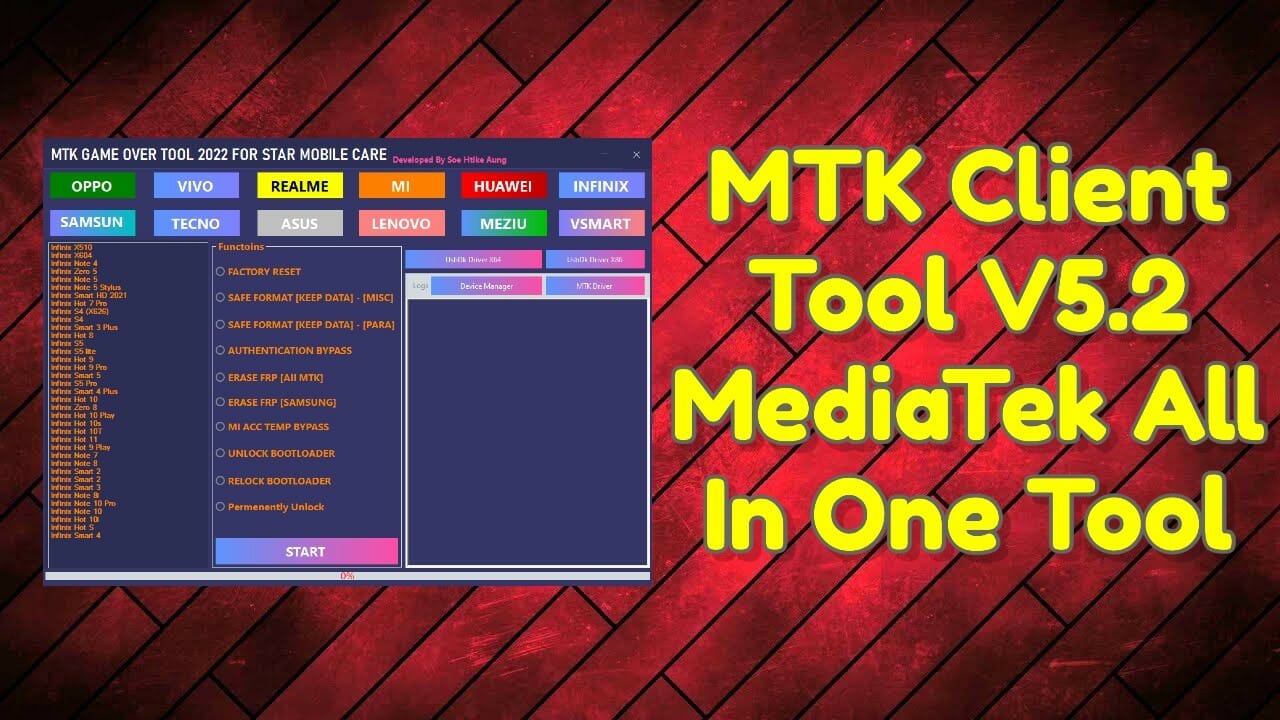
MTK Client Tool V5.2 MediaTek All In One Tool

MTK Client Tool V5.2 MediaTek all in one tool

MTK Client Tool V5.2 (Without Keygen) Free Download

